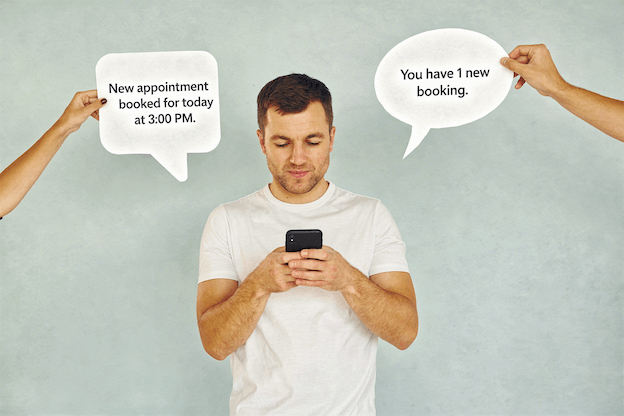
The easiest appointment to manage is the one that books itself.
How do you book things in your own life?
When you need a restaurant reservation, a doctor’s appointment, or a haircut—do you want to call during business hours, leave a voicemail, and wait for a callback? Or do you want to tap a link, pick a time, and be done in 30 seconds?
Your clients feel exactly the same way.
The businesses filling their calendars right now aren’t necessarily better at what they do. They’ve just removed the friction. They stopped asking people to call. They stopped playing phone tag. They gave clients a way to book at 10pm on a Sunday when they’re finally thinking about it.
That’s the difference between a full calendar and one with gaps.
Online booking (also called online scheduling or appointment booking) is a system that lets clients see your availability and book appointments directly—without calling, texting, or waiting for you to respond.
A typical online booking flow looks like this:
No phone tag. No back-and-forth messages. No missed opportunities while you’re busy with another client.
Every barrier between “I want to book” and “I’m booked” loses you clients. Here’s what’s happening without online booking:
68% of appointments are booked outside business hours. When someone thinks about booking at 9pm and has to wait until tomorrow to call, many never follow through. The moment passes.
When a potential client is comparing two businesses and one lets them book instantly while the other says “call for appointment,” which do they choose? The easy one.
Every booking that requires a phone call or text exchange takes 5-10 minutes of your time. Multiply that by 20 appointments per week, and you’re spending 2-3 hours just scheduling—time you could spend on actual paid work.
Fair or not, clients associate online booking with established, professional businesses. Manual-only booking can make you seem behind the times.
A good booking setup includes these elements:
| Component | What It Does | Why It Matters |
|---|---|---|
| Booking page | Shows services and availability | Lets clients self-serve |
| Instant confirmation | Sends automatic booking confirmation | Client feels taken care of |
| Reminder messages | Texts/emails automatically sent before appointment | Reduces no-shows by 80%+ |
| Easy rescheduling | Lets clients modify bookings | Reduces cancellations |
You don’t need all five on day one, but the more you have, the smoother everything runs.
There are many options depending on your needs and budget.
| Tool | Best For | Price |
|---|---|---|
| GoReminders | Booking + reminders + reviews | Free trial, then paid |
| Google Calendar Appointment Slots | Absolute beginners | Free |
| Calendly | Simple 1:1 bookings | Free tier available |
| Square Appointments | Solo service providers | Free for individuals |
| Acuity Scheduling | More customization | Starts ~$16/month |
If you offer more than one type of service, create a clear menu of what clients can book:
Good service listing:
Tips for service setup:
Set your bookable hours:
Pro tip: Start with more restrictive settings (more buffer, more notice required) and loosen them as you get comfortable.
Confirmation (sent immediately after booking):
Thanks for booking with [Business Name]!
Your appointment:
[Service] on [Date] at [Time]
Location: [Address]Need to reschedule? [Link]
See you soon!
Reminder (sent 48 hours before):
Hi [Name]! Quick reminder about your appointment on [Date]:
[Service] at [Time]
[Address]Reply to this message if you need to reschedule.
Reminder (sent 2 hours before):
See you in 2 hours! Your [Service] appointment is at [Time].
[Address]
Before sharing your booking link:
Fix any issues before real clients use it.
Having online booking is useless if no one can find it. Put your link everywhere:
Instagram Bio
Your bio link is prime real estate. Either make it your booking link directly, or use a link-in-bio tool (Linktree, etc.) with booking as the first option.
Google Business Profile
Add your booking link to your Google Business listing. When someone searches for you (or businesses like you), there’s a “Book” button right in the search results.
Facebook Page
Add a “Book Now” button to your Facebook business page. It’s in Page Settings > Add a Button.
Your Website
If you have a website, the booking link should be:
Weak CTAs:
Strong CTAs:
Be direct. Tell people exactly what to do.
Some clients will embrace online booking immediately. Others need a nudge. Here’s how to shift behavior:
When someone calls to book:
“I can get you scheduled right now, or if it’s easier, you can book anytime at [website]—it shows all my availability in real time.”
When confirming an appointment:
“You’re all set! Next time, feel free to book online anytime at [link]—it’s super quick.”
You don’t need to stop taking phone calls. But you can:
People naturally gravitate toward the easier option.
Frame online booking in terms of client benefit:
“You can book 24/7 without waiting for me to get back to you”
“Pick any time that works—no back and forth”
“You’ll get automatic reminders so you never forget”
For stubborn phone-bookers, offer a small incentive:
“If you book online, you’ll get a confirmation and reminder texts automatically—super helpful so you don’t have to remember!”
Back-to-back bookings with zero buffer lead to:
Add 10-15 minutes between slots. Your sanity is worth it.
For services over $100 or longer than 1 hour, consider requiring a deposit at booking. This dramatically reduces no-shows and last-minute cancellations.
Make it simple for clients to move their appointment. A client who reschedules is better than one who no-shows or cancels entirely.
If you offer 30 different services, the booking page becomes overwhelming. Group similar services or create packages. Less is more.
Review your booking settings monthly:
“Call for pricing” kills online booking conversions. People want to know what they’re committing to. Show prices, or at least “starting at” ranges.
Some business owners worry that online booking feels impersonal, like clients become just another transaction.
Here’s the reality: online booking frees you up to be MORE personal where it matters.
When you’re not spending hours on phone tag and scheduling logistics, you have more time and energy for the actual appointment. The service itself gets more of your attention.
Plus, you can still:
The booking method doesn’t define the relationship. Your service does.
Use this checklist to make sure everything is ready:
Ranges from free (Google Calendar, Calendly free tier, Square Appointments for individuals) to $15-50/month for more full-featured solutions. Most offer free trials.
No—you’ll gain time to make appointments more personal. The booking method is logistics; the service is where relationships are built.
Keep phone booking available but make online the default recommendation. Most clients prefer online once they try it. The few who insist on calling can still call.
Most booking tools integrate with payment processors (Stripe, Square, PayPal). You can require full payment, a deposit, or just collect card info to charge for no-shows.
Online booking typically reduces no-shows (if it includes automatic reminders). For remaining no-shows, implement a cancellation policy and consider requiring deposits.
Yes. A great booking tool lets you block time for lunch, personal appointments, days off, vacations, etc. Clients only see available slots.
Online booking and walk-ins can coexist. Just block time for walk-in availability if you want to reserve some slots, or let online booking fill your schedule and only accept walk-ins when there are gaps.
Online booking isn’t about replacing personal service with technology. It’s about removing unnecessary friction so more people actually book—and actually show up.
The businesses filling their calendars have figured this out. They’re not working harder. They’re just easier to book.
Your clients want to book at their convenience, not yours. Give them a way to do that, and watch your calendar fill up.
Setting up online booking takes less than 10 minutes. The time you save in the first week will make it worth it.
GoReminders gives you online booking, automatic text reminders, and instant confirmations—all in one place. Clients book when it’s convenient for them. You stop playing phone tag. Everyone shows up.
Start your free 14-day trial and see how much easier scheduling can be. No credit card needed.

 Appointment Reminders
 Text Reminders
 Calendar
 Appointment Confirmations
 Appointment Booking
 Text Blasts
 Accept Deposits & Payments
 Home Services
 Construction & Contractors
 Medical & Dental
 Wellness & Beauty
 Insurance Agents
 Real Estate
 Professional Services
 Automotive & Boat
 Education
 All Industries
 Reviews & Testimonials
 Case Studies
 Blog
Blog Integrations
 Contact Us
 Help Articles
 About Us